
Key Requests
A key request is a record that is generated when a developer requests an access token for an API published in the API Catalog. The Key request encompasses the following information:- The policy of which access is being requested
- The developer doing the requesting
- The catalog entry in question
- The reasoning of why the developer should have access (these are dynamic fields and can be configured)
- Auto-approve the key request.
- Have an admin approve the key-request.
- Hand off to a third-party system to manage the key-request (e.g. for billing or additional user validation). This is done via WebHooks or via the “Redirect Key Request” Portal Setting.
Key Approval
Once a key request is created, one of two things can be done to it:- It can be approved: Covered below
- It can be declined: In which case the request is deleted.
Secure Key Approval
By default, the Key Approval flow is straight forward. Once a Key Request is approved, the Developer will be notified via an email which contains the API Key. As of Dashboard version3.1.0, it is now possible to turn on a more secure key approval flow. Once the “Request Key Approval” setting is enabled, we see an additional setting:
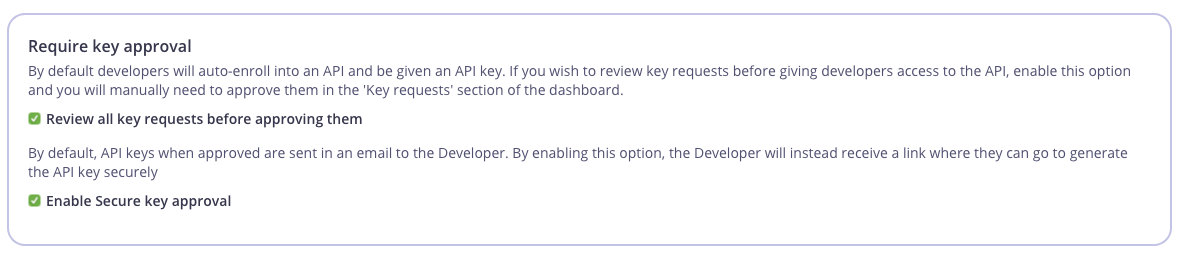 With this feature turn on, we prevent the API key from being sent in plain text via email. Instead, the once a key request is approved, the Developer will be sent a confirmation link in an email that directs them to the Portal:
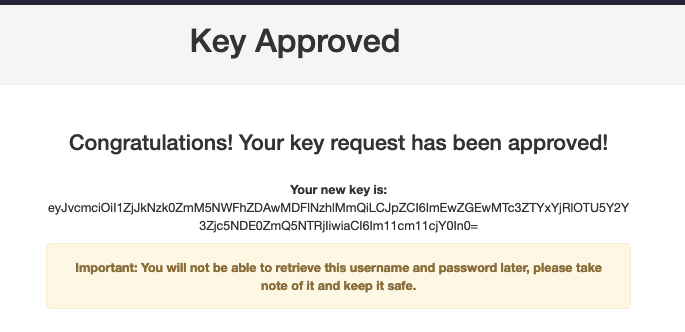
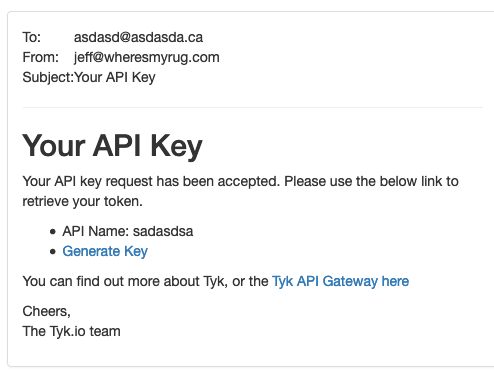 After clicking the
 Generate Key link and logging into the Portal, the key becomes available to the user: